

Starting 22 September 2026 (Singapore: 25 September 2026), Lazada will update the product prioritization between Sponsored Max – Store and Sponsored Max – Product. Products promoted through both Sponsored Max – Store and Sponsored Max – Product will no longer receive priority under Sponsored Max – Product. Instead, they will receive the same priority as other products promoted through Sponsored Max – Store, with their delivery and performance data reflected in the corresponding Sponsored Max – Store campaign.
This update provides greater flexibility in product selection while maintaining a broader product pool for store-wide promotion. No action is required unless you prefer to keep the current product prioritization between Sponsored Max – Product and Sponsored Max – Store.
– Product prioritization will change: Products promoted through both Sponsored Max – Store and Sponsored Max – Product will no longer receive priority under Sponsored Max – Product and will instead receive the same priority as other products promoted through Sponsored Max – Store.
– Performance reporting will follow Sponsored Max – Store: Their delivery and performance data will be reflected in the corresponding Sponsored Max – Store campaign.
Remarks: The existing product prioritization between Sponsored Max – Product and Sponsored Max – New Product Launcher remains unchanged.
If You Prefer to Keep the Current Product Prioritization
If you prefer to keep products in your Sponsored Max – Product campaign excluded from Sponsored Max – Store, please submit a [Request Form] by 20 September 2026 (Singapore by 23 September 2026).
By submitting the request form, you authorize Lazada to add up to 200 products to your Sponsored Max – Store Excluded Products List on the effective date.
If your Sponsored Max – Product campaign contains more than 200 products, the top 200 products will be selected based on recent spend.
After the effective date, you can review, add, and remove products from the Excluded Products List at any time in Lazada Seller Center.
Request Form: Submit Here
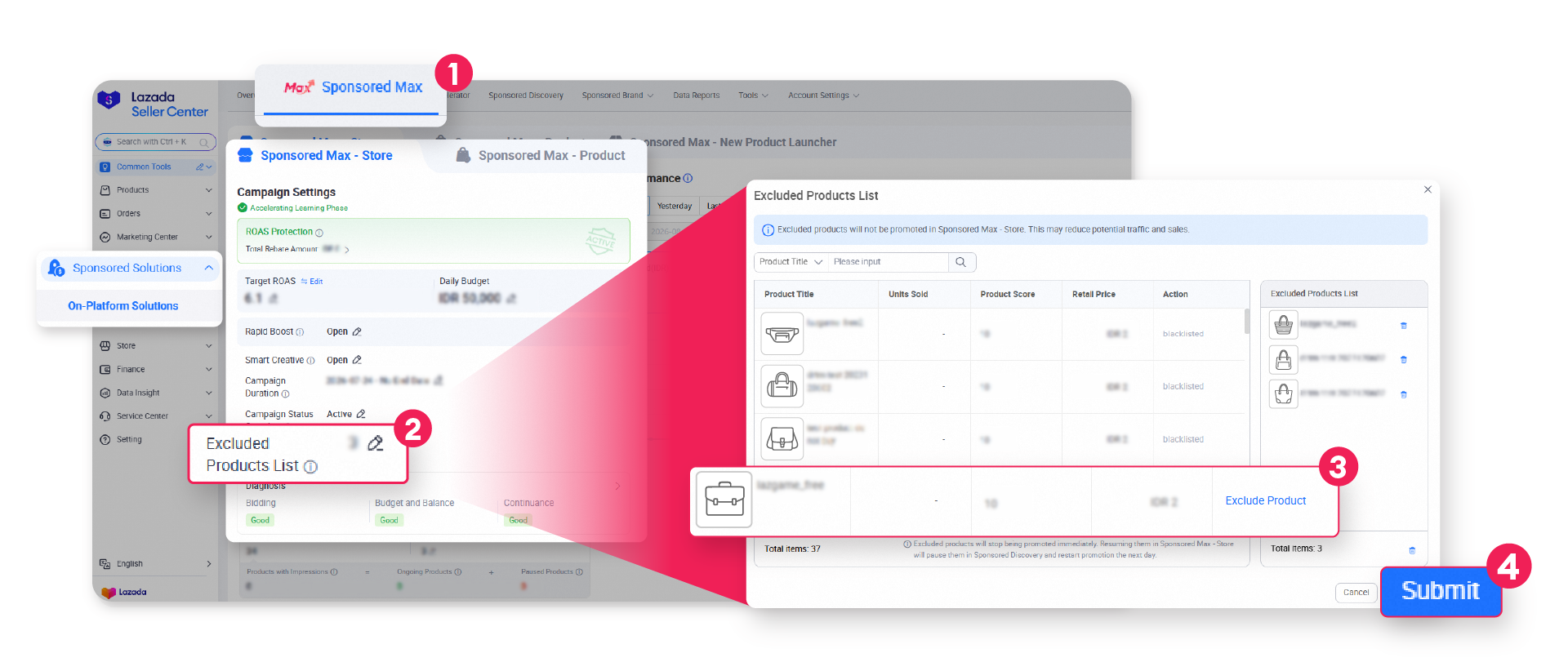
You can also manage which products are excluded from Sponsored Max – Store directly in Lazada Seller Center. This gives you ongoing flexibility to exclude individual products from Sponsored Max – Store based on your campaign needs.
1. Go to On-Platform Solutions and navigate to Sponsored Max tab
2. Find Sponsored Max – Store and go to Excluded Products List.
3. Select the products you want to exclude and click “Exclude Product”
4. Review your Excluded Products List and click “Submit”
Q: Do I need to take any action for this update?
A: No action is required. The updated product prioritization will apply automatically from 22 September 2026 (Singapore: 25 September 2026), giving you greater flexibility in product selection while maintaining a broader product pool for Sponsored Max – Store.
Q: Will my budget or campaign settings change?
A: No. This update only changes product prioritization within Sponsored Max – Store. Your budget, bids, and other campaign settings remain under your control.
Q: What happens if I submit the Request Form and have more than 200 products in Sponsored Max – Product?
A: The top 200 products will be added to your Sponsored Max – Store Excluded Products List based on recent spend. You can review, add, and remove the list after the effective date.
Q: Can I change my excluded products later?
A: Yes. After the effective date, you can review, add, and remove Excluded Products List at any time in Lazada Seller Center.
Q: Does this update affect Sponsored Max – New Product Launcher?
A: No. The existing product prioritization between Sponsored Max – Product and Sponsored Max – New Product Launcher remains unchanged.