
Sponsored Max: ROAS/ROI Protection

Update: Changes to ROAS Protection eligibility

Starting 17 September 2026, ROAS Protection will be updated with revised eligibility criteria to better align with different campaign scenarios and Sponsored Max campaign types – giving you more tailored protection and better-aligned eligibility criteria based on your campaign setup.

Key updates:

● New criteria for Mega campaign periods
● Separate criteria for Sponsored Max – Product, making it easier to qualify for a ROAS Protection rebate compared with Sponsored Max – Store
● Additional updates to ROAS Protection eligibility criteria

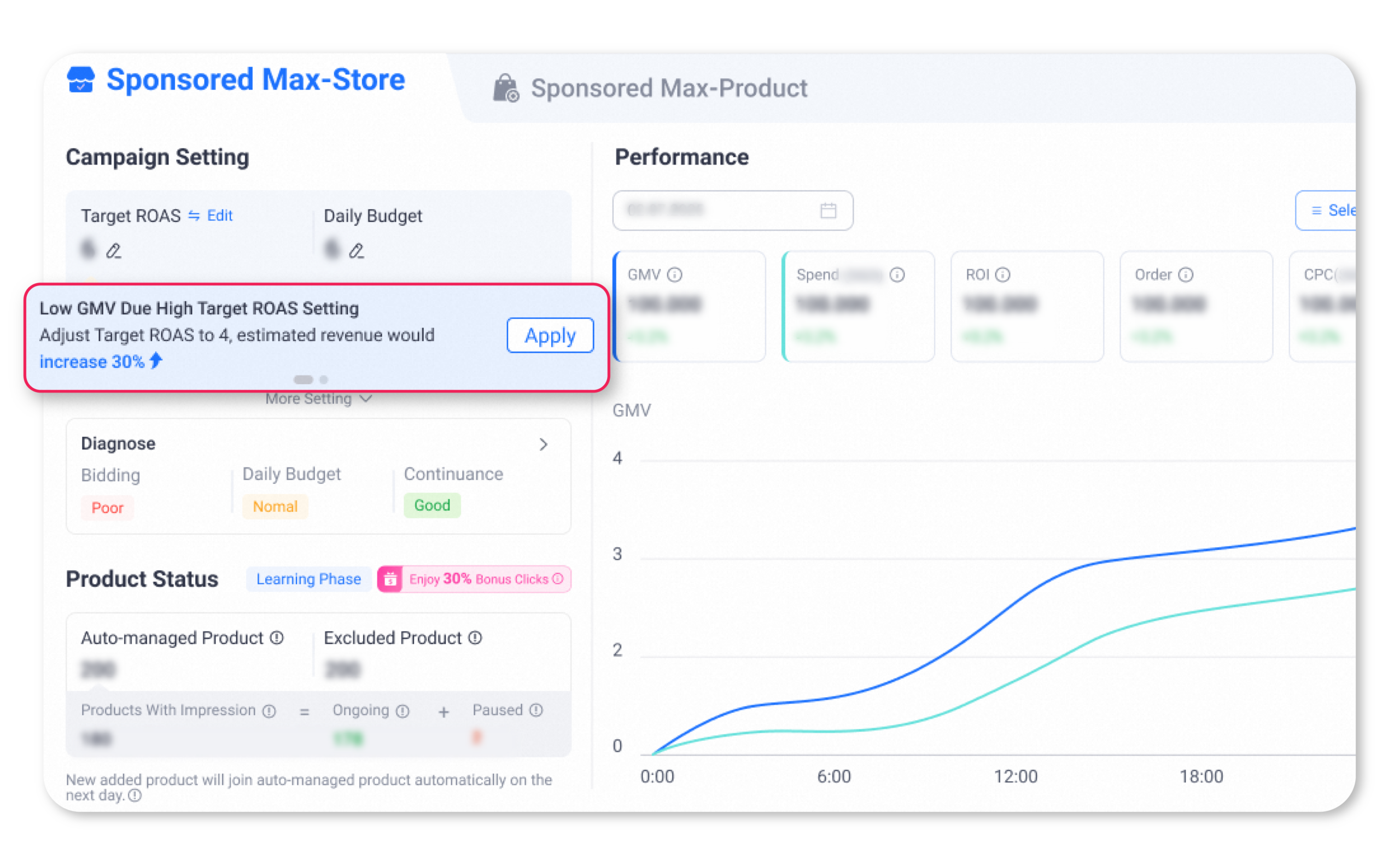
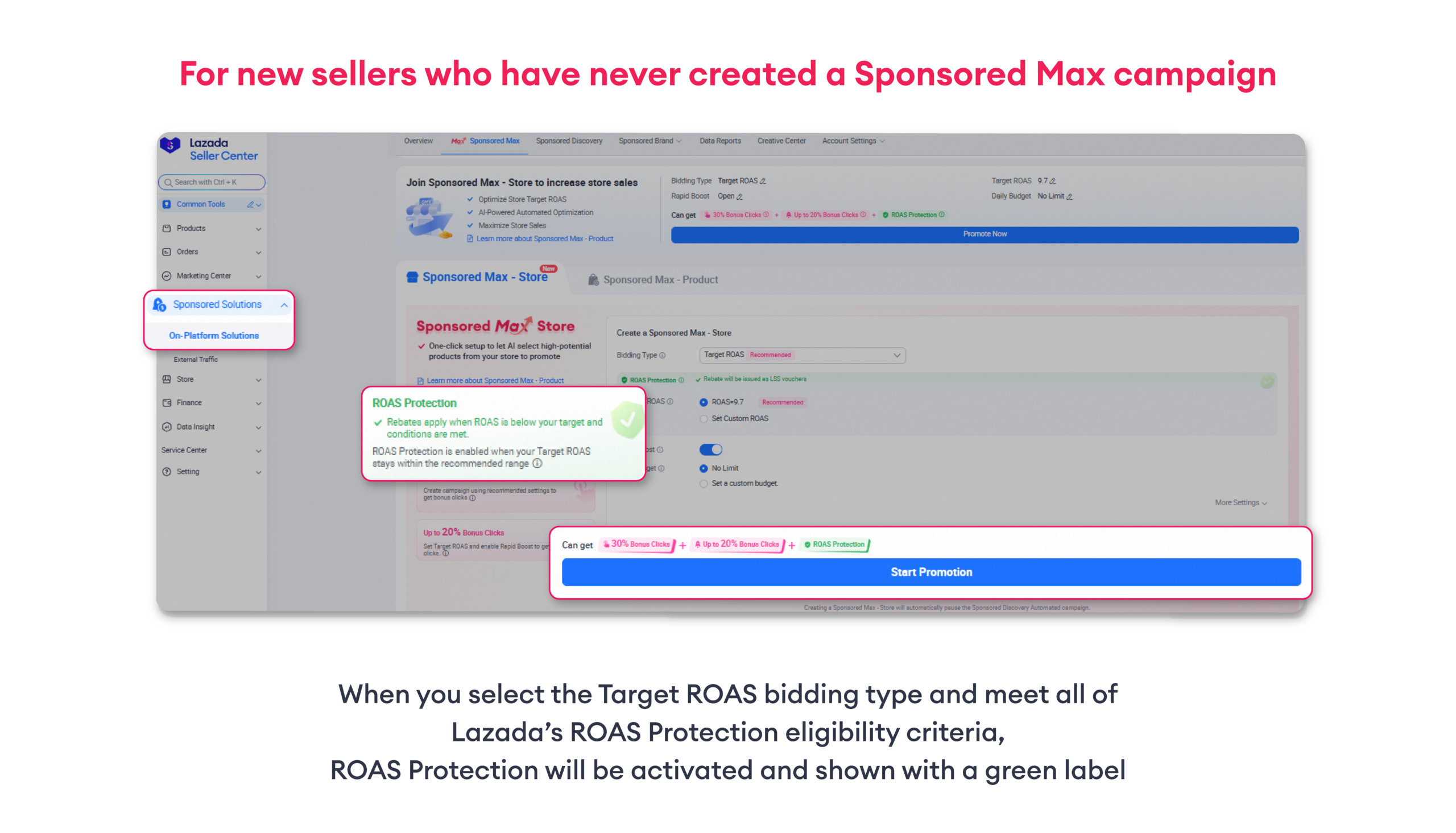
ROAS Protection

ROAS Protection is a protection mechanism for sellers using the Target ROAS bidding type in Sponsored Max, which protects a minimum level of ROAS. If eligible campaigns fail to meet the defined thresholds (subject to applicable criteria), Lazada will rebate part of the campaign spend to sellers in the form of LSS vouchers.

*Target ROAS (or Target ROI, depending on the country).

Availability: Currently available on PC only

Our performance protection covers a specific percentage of your Target ROAS

  • Standard Campaigns (No Rapid Boost Feature Activated)
    Actual ROAS >= Target ROAS * 90%
  • Rapid Boost Campaign
    Actual ROAS >= Target ROAS * 70%

Overall Eligibility Criteria for ROAS / ROI Protection

  • Sponsored Max campaign using Target ROAS bidding type
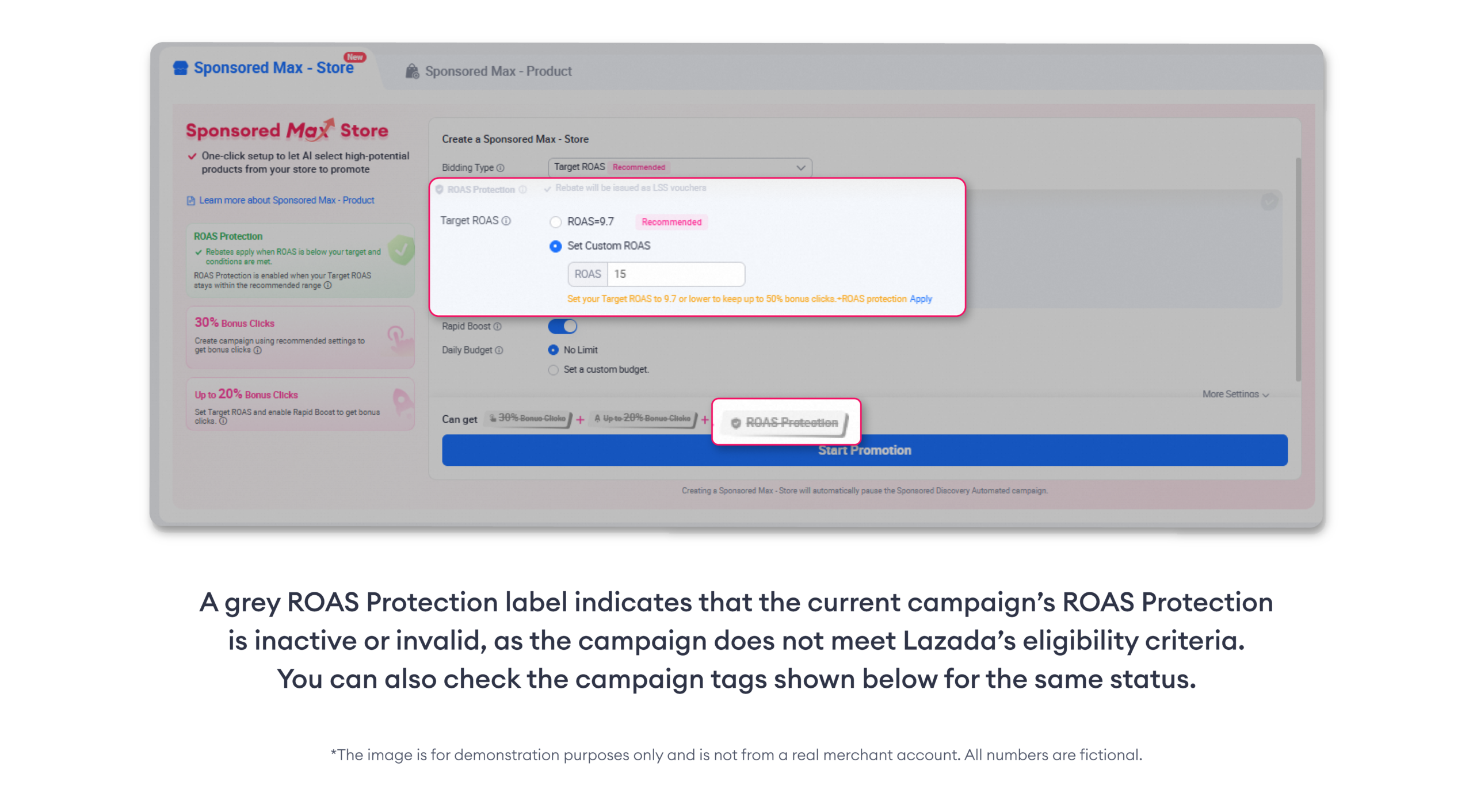
  • Bidding value must be ≤ the maximum recommended Target ROAS value
  • Daily budget ≥ the system recommended budget, or set to “No limit”
  • Campaign is not in the learning phase

1.1 Regular periods
  • Actual ROAS falls below the protected threshold on that day:
    – Standard campaign: Actual ROAS < 90% of Target ROAS
    – Rapid Boost campaign: Actual ROAS < 70% of Target ROAS
  • Rebate is calculated daily
  • Daily spend > 0
  • Campaign is not in the learning phase on that day
  • No manual budget reduction on that day
  • Minimum orders per day:
    – Sponsored Max – Store: ≥ 5 orders/day
    – Sponsored Max – Product: ≥ 3 orders/day
1.2 Mega Campaign periods*
  • Actual Period ROAS** falls below the protected threshold for the whole period:
    – Standard campaign: Actual ROAS < 90% of Target ROAS
    – Rapid Boost campaign: Actual ROAS < 70% of Target ROAS
    **Period ROAS is calculated as: Total Guided GMV ÷ Total Spend across the period
  • Rebate is calculated once for the whole period, capped at 80% of total spend during the promotional period
  • Total spend during the promotional period > 0
  • Campaign is not in the learning phase during the whole period
  • No manual budget reduction during the whole period
  • Minimum orders per day:
    – Sponsored Max – Store: ≥ 8 orders/day
    – Sponsored Max – Product: ≥ 8 orders/day
  • Campaign remains active during the whole period without pause
  • All eligibility criteria must be met for the full period

*Mega Campaign periods refer to Double Day and Mega Campaign periods

Important Notes
  • Rebate is only applicable when the campaign’s actual ROAS falls below the protected ROAS threshold. If the campaign achieves or exceeds the protected ROAS level, no rebate will be issued, as the campaign has already met the performance requirement.
  • Campaigns are eligible in all periods, including Double Day and Mega Campaign periods. During Mega periods, protection is assessed over the full promotional period.
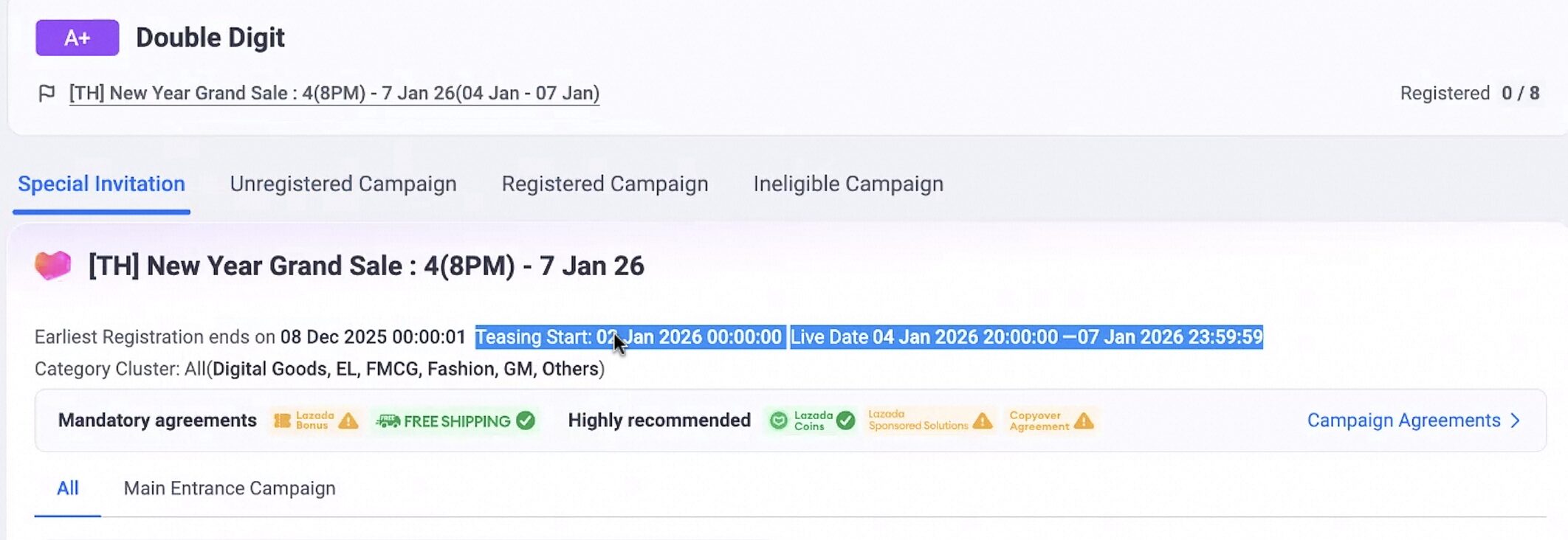
  • For ROAS Protection purposes, Mega campaign period includes Double-Digit (Double Day) sales and Mega Campaign. Each Mega campaign period runs from the Teasing start date to the Live end date (both days included). Other promotional activities are not part of the Mega campaign period.
  • Eligibility is evaluated daily, except during Mega campaign periods, where it is evaluated over the full promotional period.
  • If Rapid Boost is activated on the same day, the rebate will be calculated using the Rapid Boost campaign formula.
  • If the sellers accepts a new system-recommended Target ROAS on the same day, rebates will be calculated based on the accepted Target ROAS value.
  • If the seller pauses the campaign, the campaign will not be eligible for ROAS/ROI protection on that day (even if the campaign is reactivated on the same day).
  • If the seller adjusts the target ROAS/ROI bidding, the campaign will not be eligible for ROAS/ROI protection on that day, except for sellers who accept Sponsored Max diagnosis recommendation (by clicking “Apply” button).

Eligibility criteria are subject to change without prior notice.

How Rebate Vouchers Are Calculated

The system calculates two rebate amounts and applies the minimum value, capped at 80% of daily spend.

  • Standard Campaign (take the minimum value)
    – Rebate amount = Actual spend – (Guided GMV ÷ (Target ROAS × 90%))
    or
    – Rebate amount = Actual spend × 80%
  • Rapid Boost Campaign (take the minimum value)
    – Rebate amount = Actual spend – (Guided GMV ÷ (Target ROAS × 70%))
    or
    – Rebate amount = Actual spend × 80%

Remark: During regular periods, calculations and eligibility are based on daily performance. During Mega campaign periods, they are based on total spend and total guided GMV across the entire promotional period.

How Rebate Vouchers Are Issued

● After the system calculates the rebate, it will be issued to your account within 5 working days in the form of an LSS voucher.
● The voucher is a no-min threshold voucher with a 30-day validity period upon arrival, and it will be automatically credited to your account without manual redemption.
● The standard voucher name is: S.Max ROAS Protection Voucher

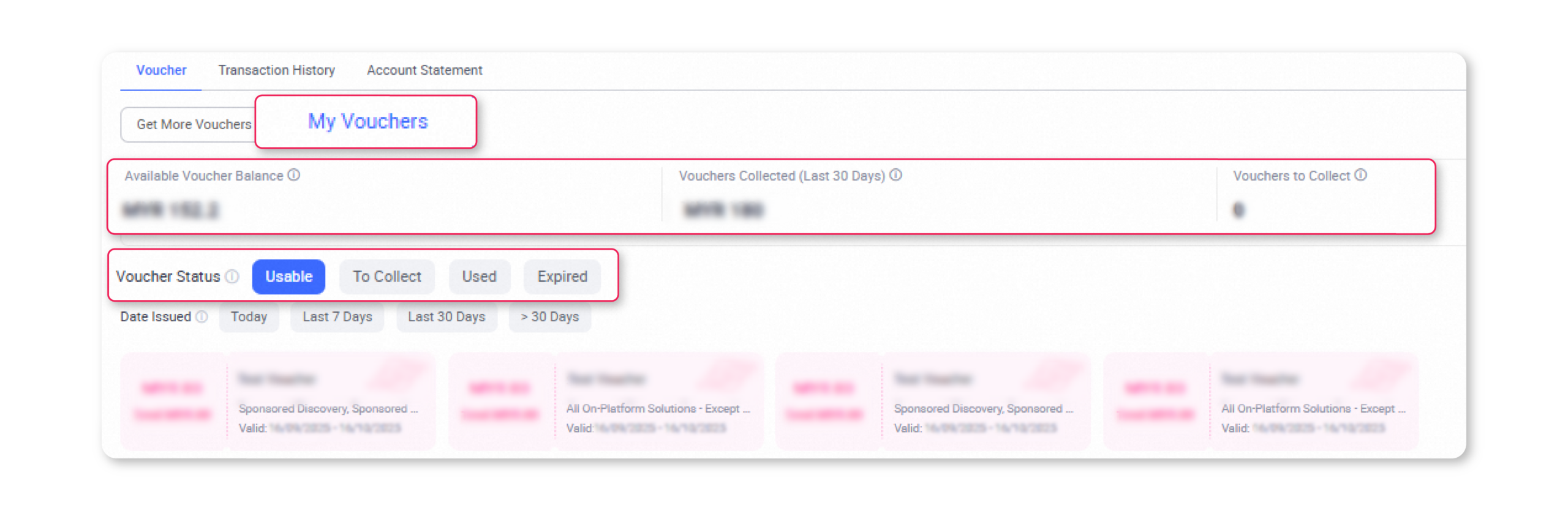
How to Check Your Rebate Voucher

Go to Lazada Seller Center → Sponsored Solutions → On-Platform Solutions → Account Settings → Account Balance, then scroll down to the Voucher section.

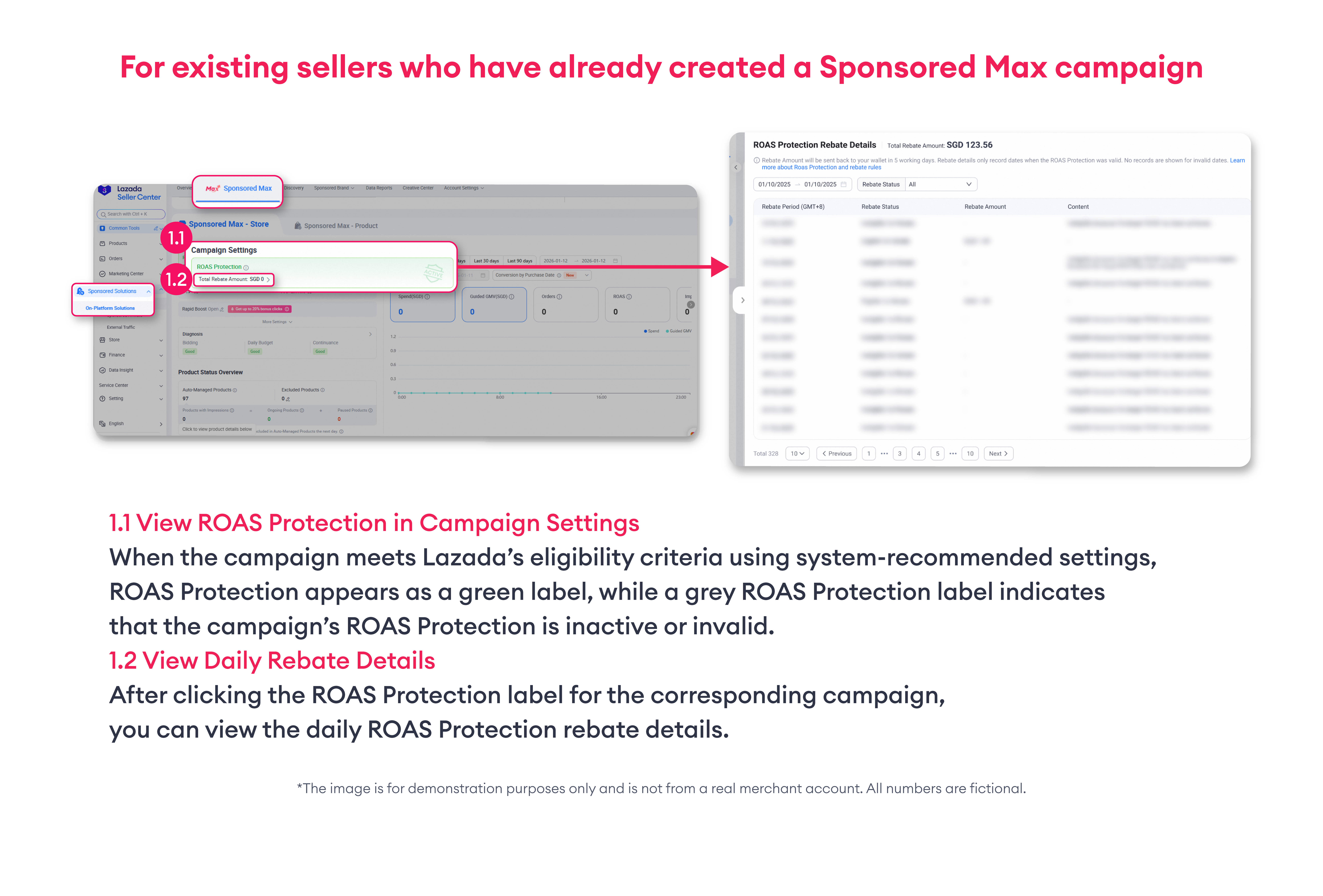
How to Check ROAS Protection Status

Go to Lazada Seller Center > Sponsored Solutions > On-Platform Solutions, then select the Sponsored Max tab and go to the Sponsored Max tab.

*Rebate eligibility is determined based on daily performance metrics. Kindly review your daily performance details to confirm your eligibility for the rebate

ROAS Protection Rebate Details Page

– Rebate Period (GMT+8): Shows the date when you ran the Sponsored Max campaign.

– Rebate Voucher Status: Displays the rebate status, indicating whether you are eligible or not eligible for a rebate voucher.

– Rebate Voucher Amount: Displays the amount of rebate you have received.

– Detail: View the reason for being eligible or not eligible under this tab.

Not Eligible Reasons for ROAS Protection

● Campaign performance exceeds the ROAS protection threshold.
● Campaign is in the learning phase.
● Order less than daily requirement
● Target ROAS was adjusted on this date.
● Bidding type was changed on this date.
● Daily budget was manually reduced on that day
● Daily budget is below the system suggested value
● (Mega periods) An eligibility criteria was not met on any day during the promotional period
● Campaign has no spend.
● Other eligibility conditions not met.

Frequently Asked Questions (FAQ)

Q: If I switch from Target ROAS bidding to Max CPC or Auto Bidding, will my campaign still be eligible for ROAS Protection?
A: No. ROAS Protection is only available for campaigns using Target ROAS bidding. Campaigns using other bidding types are not eligible.

Q: If I switch from Max CPC or Auto Bidding to Target ROAS bidding, will my campaign be eligible for ROAS Protection?
A: Yes. The campaign will be eligible as long as all ROAS Protection criteria are met after switching to Target ROAS bidding.

Q: If I adjust the bidding value, how will the rebate be calculated?
A: If the bidding value is lowered to meet the eligibility criteria, ROAS Protection will take effect starting the next day.
If the bidding value is increased above the eligible threshold, ROAS Protection will be immediately invalidated on that day.

Q: If the system-recommended Target ROAS value changes automatically and causes my current bid to exceed the eligibility threshold, will my campaign still be eligible?
A: Yes. Your campaign will remain eligible for ROAS Protection as long as no manual changes are made to the campaign settings.

Q: How can I check the Teasing Start Date and End Date for Double-Digit and Mega Campaign periods?
A: Please check the campaign’s teasing start date and end date based on the campaign tag shown on the campaign page in ASC:
Seller Center → Marketing Center → Campaign → Campaign Invitation

Q: How does ROAS Protection work during Mega campaigns?
A: During Double-Day and Birthday promotion periods, protection covers the entire period instead of individual days. Keep your settings stable throughout – reducing budget, changing bidding type, or manually increasing Target ROAS on any day voids protection for the whole period.

Q: If I reduce my daily budget, am I still protected?
A: No. Manually reducing your budget voids protection for that day, or for the entire Mega campaign period if it happens during one.

Recent stories